Find how many requests your plan includes and every other limit in one place. Limits keep Henkan Chat fast and protect your tools' own quotas; when you hit one, Henkan tells you which.
Requests and plans#
Each organisation has a plan, chosen with Henkan, and everyone in it shares its requests.
- What counts. Each question, regeneration or edited question counts as one request. Approving a tool does not.
- Flows count too. At the limit, only new chat questions pause; your Flows keep running.
| Plan | Requests | Premium connectors |
|---|---|---|
| Free | 25 per calendar month (UTC). Up to 2 tools, no Flows, no MCP access. | No |
| POC | Free for 4 weeks, 1,000 requests in total. | No |
| Pro | 500 per calendar month (UTC). | No |
| Max | 2,000 per calendar month (UTC). | Yes |
| Ultimate | Unlimited. Henkan only. | Yes |
The Free plan#
Free lets a team try Henkan Chat on two tools. Chat, sharing conversations and inviting colleagues are included, with no limit on people. Pro adds Flows, MCP access, every standard connector and 500 requests.
- 2 tools. Your organisation can hold 2 connections. Personal connections, such as each member's own Slack, don't count. Once it has 2, the Tools page shows Your Free plan includes 2 tools. with a Talk to Henkan link instead of the connect buttons. Premium connectors and your own MCP servers are not included.
- No Flows. The Flows page shows Flows are available on Pro and Max — talk to Henkan. Flows can't be created, edited, run or switched on.
- No MCP access. The MCP access page shows MCP access is available on Pro and Max — talk to Henkan, and Claude, ChatGPT or Cursor get a refusal when they call Henkan Chat.
- Nothing is deleted. When an organisation moves to Free, its connections, Flows and authorised apps stay. Flows don't run on Free (scheduled runs are skipped) and everything works again after a plan change.
Premium connectors#
Premium connectors are BigQuery, Adobe Analytics, Salesforce, Optimizely and your own MCP servers (Add any MCP server). On a plan without them, their logo shows a small Max badge, and their panel explains how to switch, with a Talk to Henkan link.
For example: BigQuery is in the Max plan. Your workspace is on Pro. Ask Henkan to switch to Max, or to try BigQuery. Connections you already have keep working.
Where you see your usage#
| Where | What it shows |
|---|---|
| After your name (bottom of the sidebar) | Your organisation's plan as a small pill, for example Camille Martin Pro or Free. Hover it to read it in full, such as Ultimate plan · unlimited requests. A POC shows its own line instead. |
| Bottom of the sidebar | Requests used in the plan's period, for example requests this month 120 / 500 or POC requests 340 / 1,000. The bar turns amber at 90%. Nothing is shown on an unlimited plan. |
| Above the chat box | Notes when you get close to the limit or reach it (below). |
Notes above the chat box#
- From 80%. A note says, for example, You've used 80% of this month's 500 requests. Resets on 1 Nov.
- At the limit. Questions pause: You've reached this month's 500 requests. Questions resume on 1 Nov. Talk to Henkan to change plan. Monthly limits reset on the 1st (UTC).
- End of a POC. From 5 days before its end: Your POC ends in 5 days. Your conversations, tools and Flows stay as they are., with Choose a plan. After the end, questions pause: Your POC has ended. Talk to Henkan to choose Pro or Max.
Special cases#
- Slack. Questions asked from Slack count towards the organisation Slack uses.
- No plan yet. The organisation keeps a daily limit of 1,000 requests, reset at midnight UTC (requests today in the sidebar).
- Demo workspace. The Acme demo workspace has a limit of 150 requests a day, and its flow runs count too.
Validate your POC#
On a POC, the new-chat screen opens with a Validate your POC card: how many of the 5 required tasks your organisation has done, the days left, and a button for each task. The tasks count for the whole organisation, not per person.
| Task | Done when |
|---|---|
| Connect your first tool | A first tool is connected. |
| Ask a first question and get an answer | A question got an answer. |
| Connect a second tool | A second tool is connected, not a second account of the same tool. |
| Share an answer or invite a colleague | A conversation or Flow is shared, or a second person from your company is in the organisation. |
| Create a Flow and run it | One Flow run finished. |
| Send a report to Slack or Notion (optional) | A Flow run finished with a Slack or Notion block. |
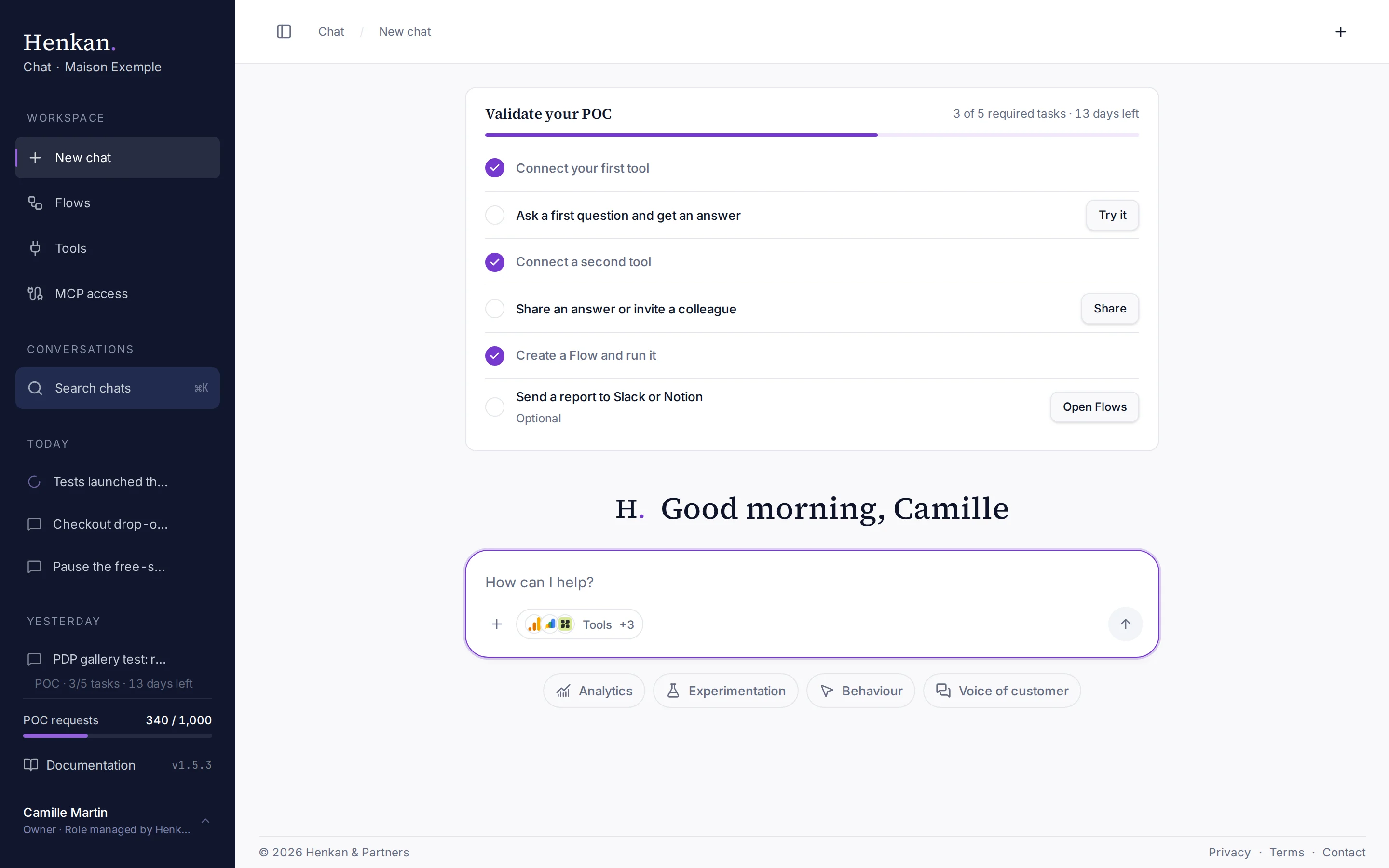
The card stays until the 5 required tasks are done, then shows POC validated once and can be closed. The sidebar shows the same progress on one line, for example POC · 4/5 tasks · 18 days left.
Chat#
| Limit | Value |
|---|---|
| Requests | Depend on your plan, see above. |
| Tool steps per answer | 12. Beyond that, the answer ends with Stopped after 12 tool steps. |
| Time per tool call | 60 seconds. |
| Time per answer | 5 minutes in total. |
| Size of one tool result | 16,000 characters. Longer results are cut, and Henkan pages or narrows the query instead of repeating it. |
| Attachments per message | 8 files. Images up to 5 MB each, text files up to 200 KB each. |
Flows#
| Limit | Value |
|---|---|
| Runs at the same time | 2 per user. |
| Connector block | 60 seconds per call. |
| Henkan agent block | 4 minutes, and up to 30 tool calls (10 by default). |
| Whole run | 10 minutes. |
| Retries | 2, for temporary errors (rate limits, server errors, timeouts), with increasing delays. |
| Merge block timeout | 10 to 600 seconds (300 by default). |
| Event triggers | Checked every 10 minutes. |
| PDF download links | Valid 7 days. |
Slack#
| Limit | Value |
|---|---|
| Questions in progress | 2 per user at the same time. |
| Account link | Single use, expires after 15 minutes. |
Connected tools#
These limits come from the tools themselves.
| Tool | Limit |
|---|---|
| Google Analytics 4 | Google's hourly token quota per property. Henkan warns you when it runs low and does not retry once it is exhausted. |
| Google Search Console | Data lags about 3 days. |
| Contentsquare | Metrics API: 92 days per query. Official MCP: analytics calls count against your Contentsquare plan quota. |
| Qualtrics | Exports capped at 50,000 responses. |
| Microsoft Clarity | Last 1 to 3 days only, 10 API calls per project per day (repeated requests the same day are free). |