Henkan reads your BigQuery datasets with a Google Cloud service account and runs read-only SQL for you. It is the way to get raw, unsampled GA4 export data, with a cost cap your organisation controls.
Before you start#
You need a service-account key (JSON) for a Google Cloud project that can read your data. The steps below show where to click. Ask your data team for the key if someone else manages Google Cloud.
To do this you need Create Service Accounts and Project IAM Admin on the project to create the account and grant roles, and Service Account Key Admin to create the key (a project Owner has all three).
Create the service-account key#
Simplified views of the Google Cloud console; its look may differ slightly.
1. Open Service accounts. Go to console.cloud.google.com, pick the project in the project selector, then open IAM & Admin › Service accounts and select Create service account.
2. Name the account. Enter a name such as henkan-chat. Google fills in the Service account ID from it. Select Create and continue.
henkan-chat.3. Grant two read roles. Add BigQuery Job User (roles/bigquery.jobUser, runs queries) and BigQuery Data Viewer (roles/bigquery.dataViewer, reads tables). Select Continue, then Done.
Job User must be on the project that runs and pays for the queries. Data Viewer can instead be granted only on the GA4 export dataset, or on the project that holds it, if your data lives elsewhere. Give the account read roles only, so it can never change data. When you connect, Henkan checks both roles and tells you which one is missing.
4. Open the Keys tab. Back in Service accounts, select the email of henkan-chat, open Keys, then Add key › Create new key.
henkan-chat, then open the Keys tab.5. Create a JSON key. Keep JSON and select Create. Your browser downloads the key file. Google can't download it again, so keep it safe and never share it or put it in a shared folder.
6. Paste it in Henkan. Open the downloaded file in a text editor, copy everything, then follow Connect below.
analytics_ followed by your GA4 property ID.events_YYYYMMDD, shown as one grouped line.Connect#
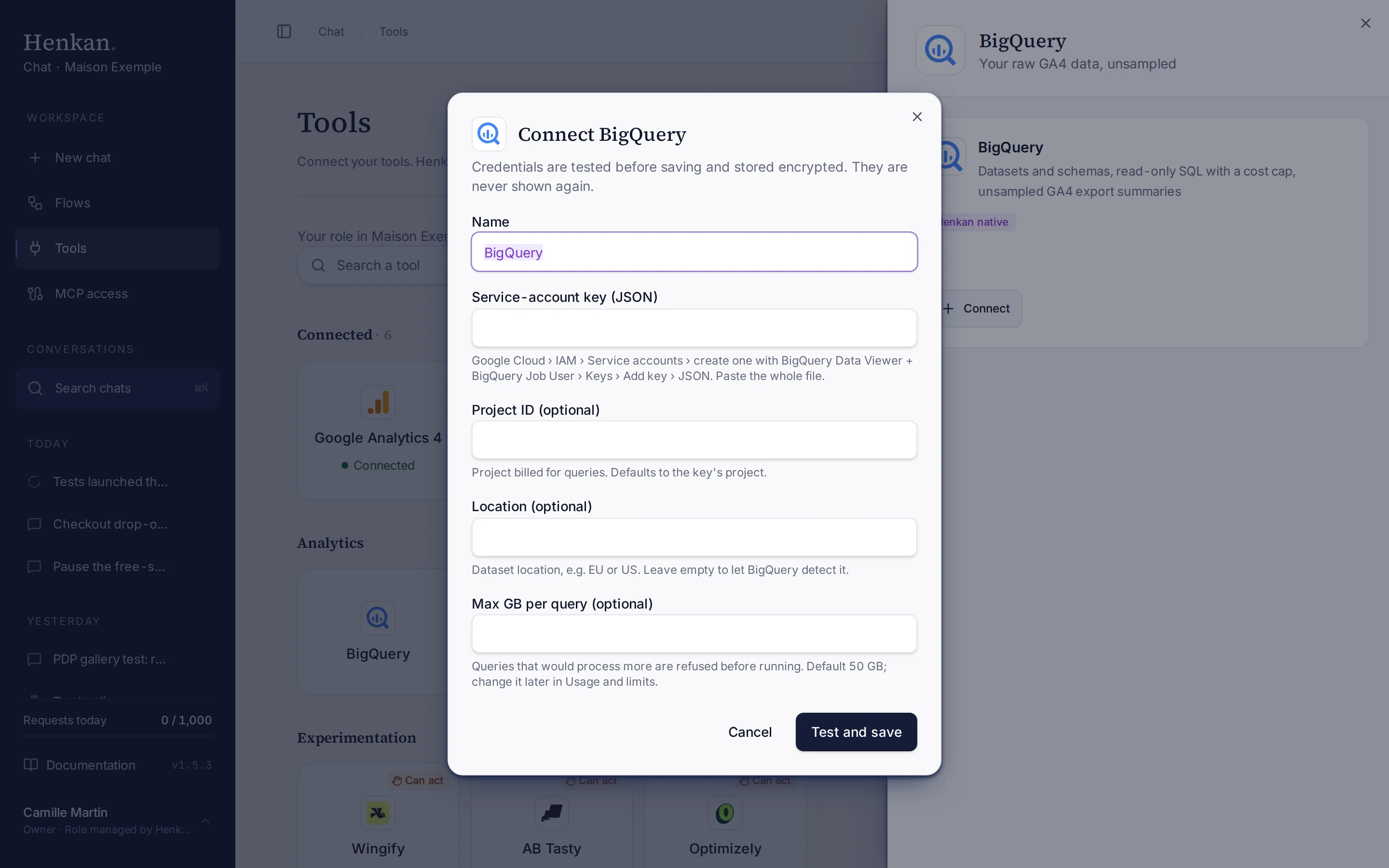
- Open Tools In the sidebar, select Tools, then select BigQuery and Connect.
- Paste the key In Service-account key (JSON), paste the whole key file.
- Fill in the optional fields Project ID: the project billed for queries (defaults to the key's project). Location: for example EU or US (leave empty to let BigQuery detect it). Max GB per query: default 50 GB.
- Select Test and save Henkan checks the key and the roles, then stores the key encrypted. It is never shown again.
What you can ask#
- "Which datasets do we have? Find the GA4 export for Maison Exemple FR."
- "Daily users, sessions, purchases and revenue from the GA4 export for September, unsampled."
- "Show the schema of events_20261001."
- "Revenue by item category last week from the GA4 export. Aggregate in SQL."
What Chat can and can't do#
| Tool | What it does | Read or write | Asks first? |
|---|---|---|---|
| List projects | Google Cloud projects the service account can see. | Read | No |
| List datasets | Datasets of a project. GA4 exports are named analytics_<property id>. | Read | No |
| List tables | Tables and views. GA4 daily tables appear as one events_* line with the first and last day. | Read | No |
| Get table schema | Columns, types, nested fields, row count, size and partitioning. | Read | No |
| Query | Runs one read-only GoogleSQL SELECT, after a dry run, within the connection's limits. | Read | No |
| GA4 daily summary | Daily users, sessions, page views, purchases and revenue from a GA4 export. | Read | No |
Only single SELECT queries run. Henkan refuses any other statement.
Limits and good to know#
Usage and limits. Open Tools › BigQuery › Advanced settings › Usage and limits. It shows this month's usage (GB read out of the budget, number of queries, and an estimated cost at Google's on-demand list price, labelled as an estimate). It also lists the month's largest queries and who ran them: a person, a flow or an MCP client. Organisation owners can change the limits; members see the same figures read-only.
| Limit | Default | What it does |
|---|---|---|
| Max per query | 50 GB | A query whose dry run estimates more is refused. |
| Monthly budget | 500 GB | Once a query would take the calendar month (UTC) over the budget, BigQuery queries pause until the 1st of next month, or until an owner raises the budget. |
| Alert at | 80% | Organisation owners get one email per connection and month when usage reaches this share of the budget. |
Every BigQuery answer tells the AI how much budget is left. A refused query tells it to narrow the query (fewer days, fewer columns, aggregate in SQL) or to ask an organisation admin. Cached results are free and count as 0 GB. BigQuery bills at least 10 MB per query and per table it references.
Who pays. Google bills the data each query reads to your own Google Cloud project: the Project ID you entered, or the key's project. Henkan does not charge for BigQuery data; your Henkan plan covers the AI requests only. The used figure is what BigQuery reports as billed, so it can differ slightly from your Google invoice. The estimate uses Google's on-demand list price of $6.25 per TiB; the first 1 TiB of queries each month is free per billing account, and capacity (editions) pricing, regions and discounts change what you really pay.
GA4 exports. Export figures differ a little from the GA4 interface (consent modelling, user definitions, thresholds). For report-style questions on one property, Google Analytics 4 is often quicker.
Troubleshooting#
| Error or symptom | Fix |
|---|---|
| The service account cannot read datasets | Grant it BigQuery Data Viewer (roles/bigquery.dataViewer). |
| The service account can read data but cannot run queries | Grant it BigQuery Job User (roles/bigquery.jobUser) in the billed project. |
| Only SELECT queries are allowed | Henkan only reads. Ask for a SELECT instead. |
| A query is refused for its size | Narrow it: fewer days, fewer columns, or aggregate in SQL. An owner can raise Max per query. |
| BigQuery queries are paused for the month | The monthly budget is reached. An owner can raise it in Usage and limits, or wait until the 1st. |
| Key creation is blocked in Google Cloud | Ask your organisation admin for an exception to iam.disableServiceAccountKeyCreation. |
Sources#
- BigQuery pricing (Google Cloud)
- Run a query: required roles and dry runs (Google Cloud)
- Create service accounts (Google Cloud)
- Create and delete service account keys (Google Cloud)
- Troubleshoot organization policy errors for service accounts (Google Cloud)
- BigQuery Export for Google Analytics 4 and Set up BigQuery Export (Google Analytics Help)