Henkan reads your Wingify campaigns, goals and variations, and reports results with its own statistics next to Wingify's. It can pause or resume a campaign, and always asks you first.
Before you start#
| Field | Where to find it |
|---|---|
| API token | Signed in to Wingify, open Developers › API tokens (app.wingify.com/#/developers/tokens) and create a token. Choose a permission level that allows changes if you want Henkan to be able to pause campaigns. Wingify's API is available on the Enterprise plan. |
| Account / workspace ID (optional) | Leave empty for your main workspace, or enter a sub-account ID. |
Connect#
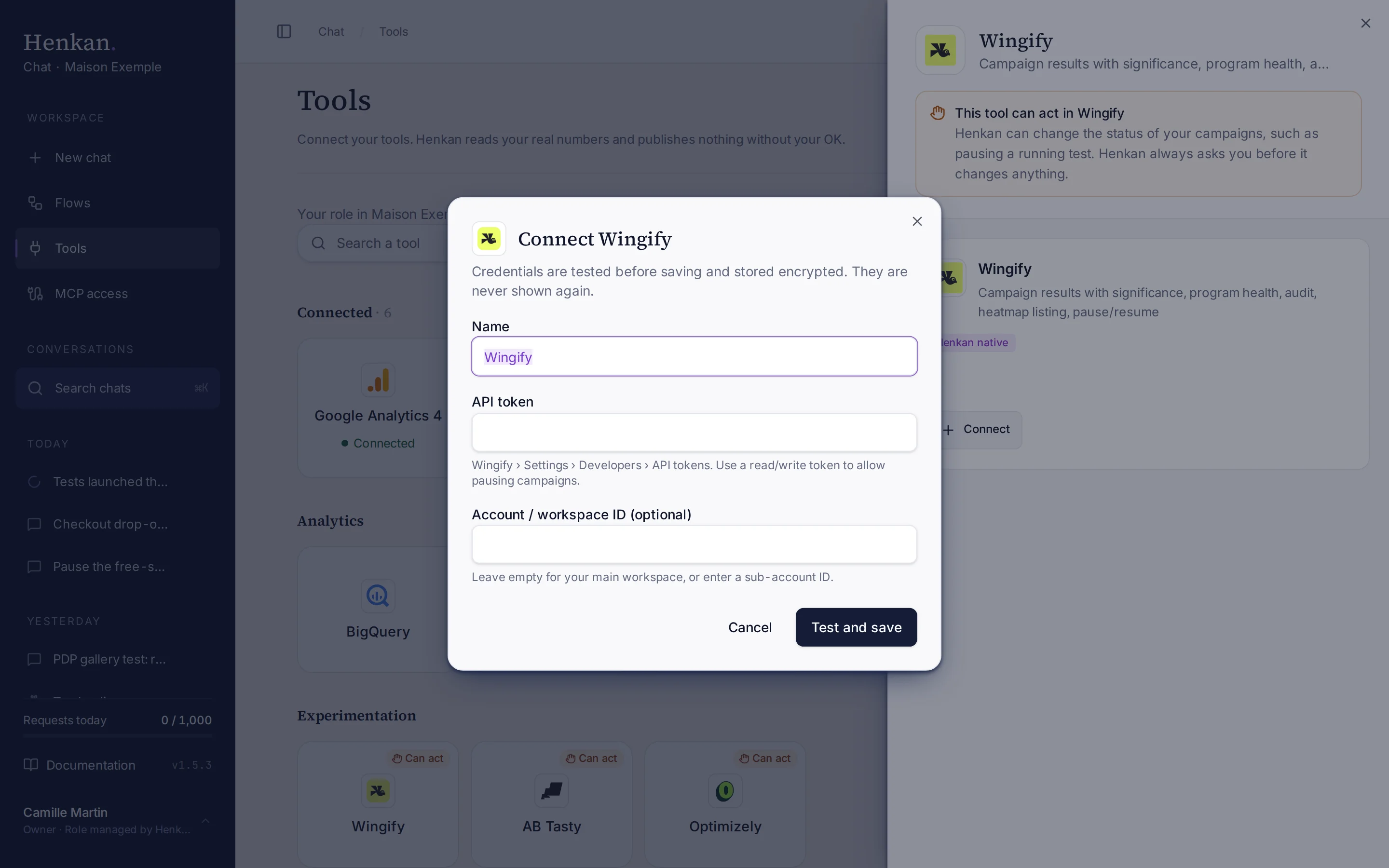
1
Name. Helps you recognise this connection.
2
Help text. Where to create the token in Wingify.
3
Test and save. Checks the token before storing it.
- Open Tools In the sidebar, select Tools, then select Wingify and Connect.
- Paste the token In API token, paste your token. Add a workspace ID if needed.
- Select Test and save The token is checked, then stored encrypted. It is never shown again.
What you can ask#
- "Report on the homepage hero campaign: uplift, confidence interval, SRM."
- "Which campaigns have been running for more than 6 weeks?"
- "Audit our Wingify workspace."
- "Pause the cart reminder campaign."
What Chat can and can't do#
| Tool | What it does | Read or write | Asks first? |
|---|---|---|---|
| Find | Finds workspaces, campaigns and goals by name across your Wingify connections. | Read | No |
| List accounts | Workspaces and sub-accounts the token can access. | Read | No |
| List campaigns, goals, variations, segments | Lists campaigns by status or type, and their parts. | Read | No |
| Get campaign | Status, URLs, traffic, variations and split, goals, segments, days running. | Read | No |
| Get campaign report | Per goal and variation: visitors, conversions, conversion rate, uplift, 95% confidence interval, p-value, SRM and a verdict, next to Wingify's own figures when the API exposes them. | Read | No |
| List insights | Heatmap campaigns and other Insights items, with links to Wingify. | Read | No |
| Program overview | Campaigns launched, running and stopped, win rate, long or short runs, SRM, overlaps on the same URL. | Read | No |
| Audit | A scored checklist of the workspace with one-line fixes. | Read | No |
| Update campaign status | Pauses or resumes a campaign. | Write | Yes, always |
Limits and good to know#
- Report figures depend on the API. When Wingify's API doesn't expose a campaign's report numbers, Henkan says so and links to the report in Wingify.
- Heatmaps are listed with links. Henkan can't read heatmap images.
- Costs and who pays. Your Henkan plan covers the AI requests: each question counts towards your organisation's requests (see Usage and limits). Any API costs on Wingify's side fall under your contract with Wingify.
Troubleshooting#
| Error or symptom | Fix |
|---|---|
| Wingify rejected the credentials | Create a new token under Developers › API tokens and connect again. |
| Wingify access denied on a status change | The token is read-only. Create a read/write token. |
| A workspace is missing | Enter its sub-account ID, or connect it as another account. |
| Wingify rate limit reached | Wait a moment, then ask a narrower question. |
Sources#
- How to Access Wingify API (Wingify Help)