Henkan reads Piano Analytics reports with your own Piano permissions. It compares periods, tests whether a rate really changed and shows trends; it only reads.
Before you start#
| Field | Where to find it |
|---|---|
| Access key and Secret key | In Piano Analytics: your profile page › API Keys tab › Create a new API Key. Piano shows the full key (access key and secret key) only once. Your role must allow handling data: Administrator, Delegate, Advanced Analyst, Analyst, Data Supervisor, or a custom role with the "Handle data" tool. The key has the same site rights as you. |
| Site IDs | Piano › Settings › Sites. Separate several with commas, with an optional name: 123456=Brand FR, 789012=Brand UK. |
Piano's API can't list sites, so Henkan only sees the site IDs you enter.
Connect#
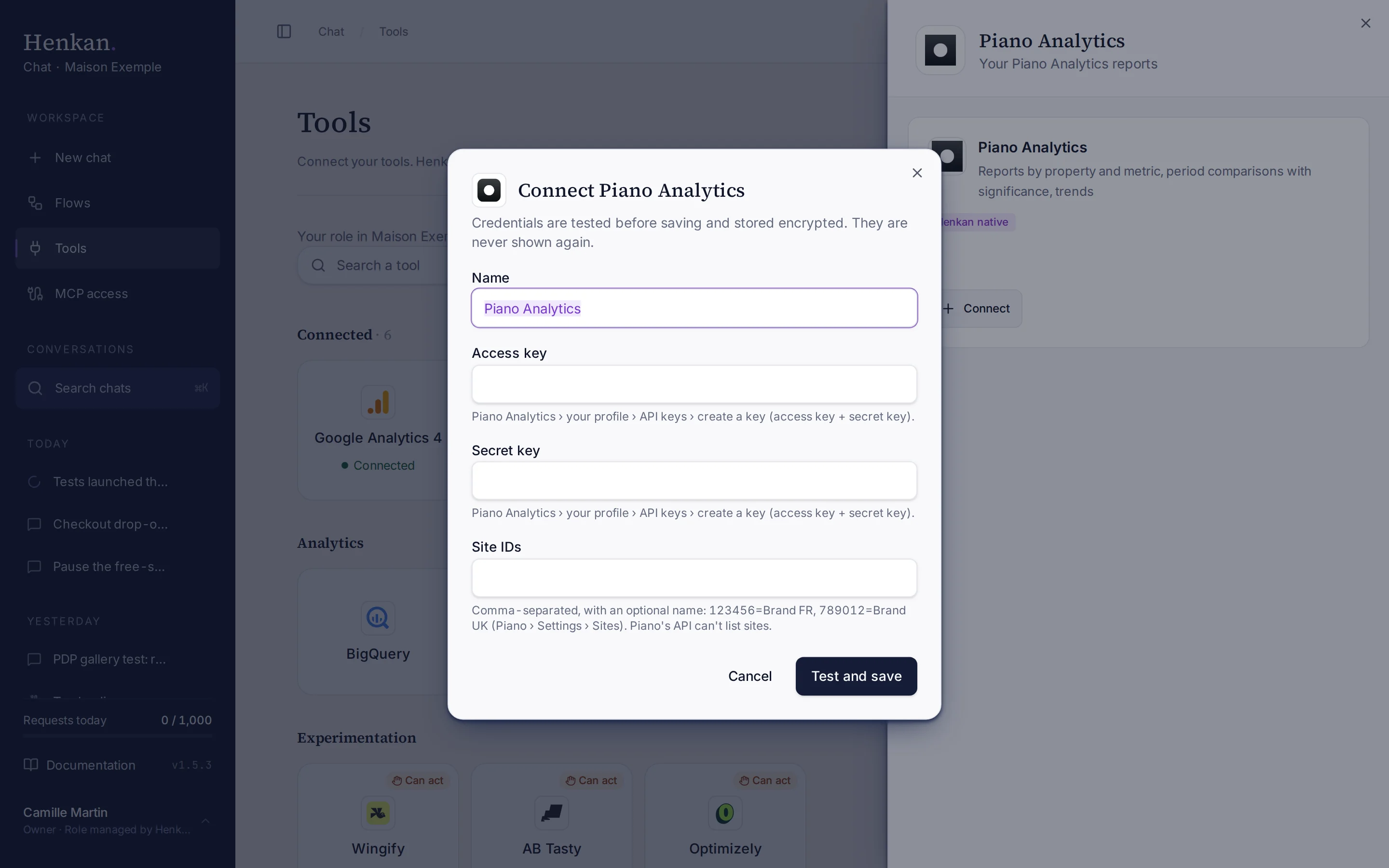
1
Name. Helps you recognise this connection.
2
Help text. Where to create the API keys in Piano.
3
Test and save. Checks the keys before storing them.
- Open Tools In the sidebar, select Tools, then select Piano Analytics and Connect.
- Enter the keys Paste the Access key and Secret key.
- Enter the site IDs For example
123456=Brand FR, 789012=Brand UK. - Select Test and save The keys are checked, then stored encrypted.
What you can ask#
- "Visits and conversions by source for Brand FR last month."
- "Compare last week with the same week last year. Did the conversion rate really change?"
- "Daily visits trend for the top 5 pages over the last 90 days."
What Chat can and can't do#
| Tool | What it does | Read or write | Asks first? |
|---|---|---|---|
| List sites | The sites of this connection, with their names. | Read | No |
| Get data | Any report: properties × metrics for one or more sites, with filters, sort and paging. | Read | No |
| Compare periods | A period vs the previous one or last year, with changes, and an optional rate test (two-proportion z-test, 95% confidence). Uses 2 API calls. | Read | No |
| Trend | Metrics by day, week or month, optionally for the top values of a property. | Read | No |
Limits and good to know#
Costs and who pays. Your Henkan plan covers the AI requests: each question counts towards your organisation's requests (see Usage and limits). Any API costs on Piano's side fall under your contract with Piano.
Troubleshooting#
| Error or symptom | Fix |
|---|---|
| Piano Analytics rejected the credentials | Create a new key pair in your profile › API keys. |
| Piano Analytics access denied | Your Piano role can't handle data. Ask a Piano admin for a role with the "Handle data" tool. |
| Enter at least one Piano site ID | Add the site IDs from Settings › Sites. |
| Piano Analytics rate limit reached | Wait a moment and ask again. |
Sources#
- API Keys (Piano Help)
- Authentication (Piano Developers)
- How it works (Piano Developers)
- Error codes (Piano Developers)
- Terms & conditions (Piano Developers)