Henkan reads your GA4 properties through Google's Analytics Data and Admin APIs, signed in as you. It runs the reports your question needs and never changes your Analytics configuration or data.
Before you start#
- A Google account that can see the property in Google Analytics. Henkan sees exactly the properties this account sees, no more.
- Nothing to create in Google Cloud. There is no key or project to set up: you only sign in.
- Several Google accounts are fine. Connect each one separately (see below).
Henkan asks Google for one permission only: read-only access to Analytics (analytics.readonly).
Connect#
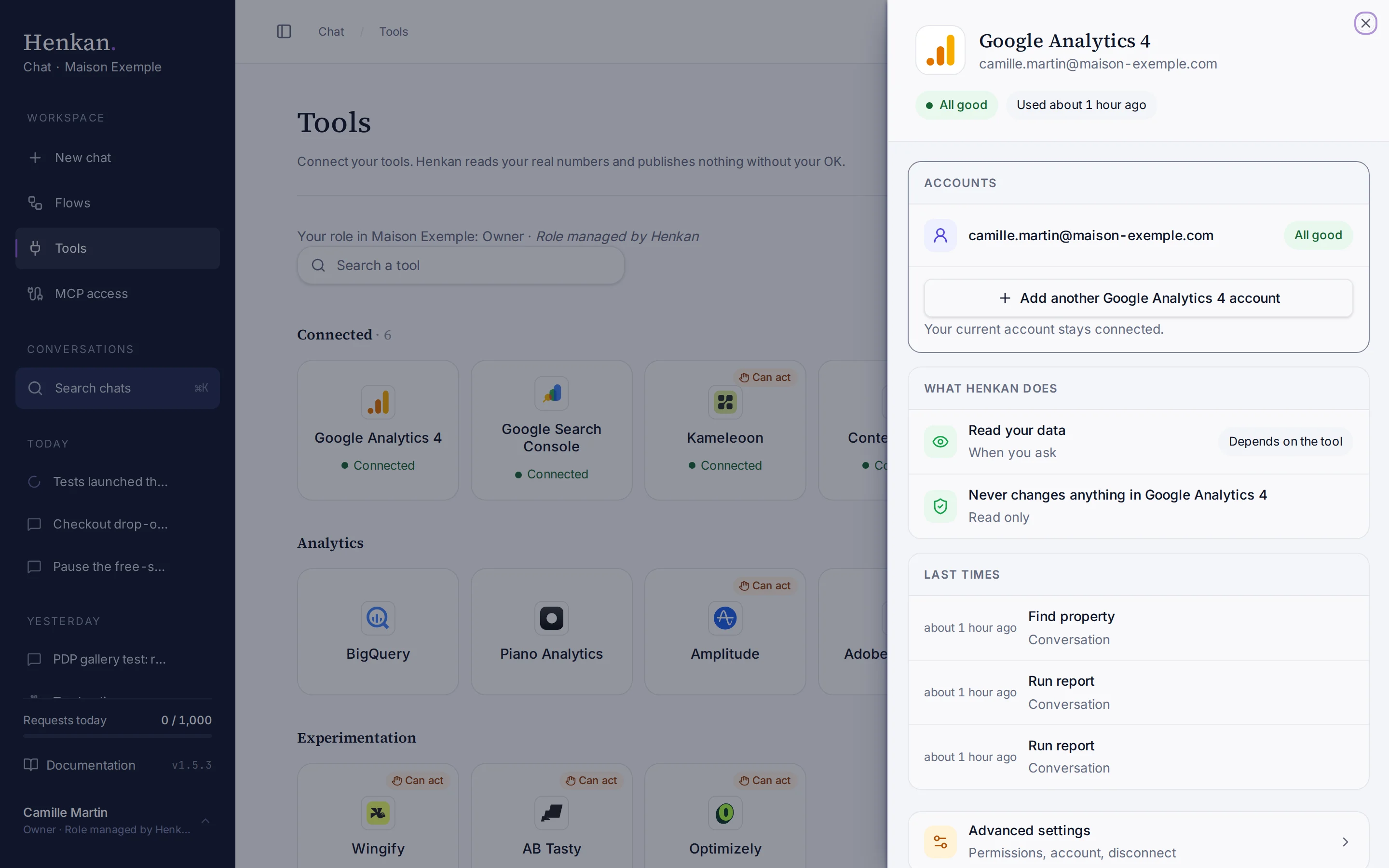
- Open Tools In the sidebar, select Tools, then select Google Analytics 4.
- Select Connect A Google sign-in window opens.
- Choose the Google account Pick the account that has access to your properties, then allow read-only access to Analytics.
- Check the result The tile shows Connected and the panel shows the account's email address.
To add another Google account, open Google Analytics 4 and select Add another Google Analytics 4 account in the Accounts block. Your current account stays connected, and each connection keeps its own properties.
What you can ask#
- "Sessions, revenue and conversion rate for Maison Exemple FR last month, compared with the month before."
- "Which channels brought the most purchases this quarter, by device?"
- "Show the funnel view_item → add_to_cart → begin_checkout → purchase for the last 30 days on mobile."
- "Read out the free-shipping test tracked in GA4: is variant B better than control?"
- "Audit the tracking of the Maison Exemple UK property."
What Chat can and can't do#
| Tool | What it does | Read or write | Asks first? |
|---|---|---|---|
| Find property | Finds a property by brand or site name across all your Google connections. | Read | No |
| List properties | Lists the accounts and properties of one connection. | Read | No |
| Get metadata | Lists the dimensions and metrics a property offers. | Read | No |
| List custom definitions | Lists custom dimensions, custom metrics and key events. | Read | No |
| Run report | Runs a report, with an optional comparison period in the same call. | Read | No |
| Run realtime report | Reports on the last 30 minutes. | Read | No |
| Run pivot report | Crosses two dimensions, for example channel × device. | Read | No |
| Batch reports | Runs up to 5 reports in one call. | Read | No |
| Run funnel | Users, completion and drop-off per funnel step. | Read | No |
| AB test readout | Results of a test tracked with a GA4 variant dimension: uplift, p-value, 95% confidence interval, SRM check and a verdict. | Read | No |
| Audit property | A scored tracking checklist with a one-line fix per issue. | Read | No |
Read tools run without asking by default. An owner can set them to Ask before running in Advanced settings. Henkan cannot create, edit or delete anything in Google Analytics.
Limits and good to know#
Multiple Google accounts. Each Google account is its own connection. When you name a brand or site, Henkan searches every connection and uses the one that can see that property. It only queries a property through a connection that lists it.
Property search. You don't need property IDs. Say "Maison Exemple FR" and Henkan matches account and property names, ignoring case and accents. If several properties match, it tells you which one it used.
Data quality. Every report starts with the property, its time zone, its currency and a Data quality line:
| Signal | What it means | What Henkan does |
|---|---|---|
| Sampled | The request went over GA4's event limit, so GA4 used part of the data and scaled it up. The share read is shown. | Says the figures are estimates. Shorter periods are less likely to be sampled. |
| Privacy thresholds | GA4 withholds rows that could identify people, typically with demographics, search queries or small numbers of users. Google sets these thresholds; nobody can change them. | Says rows may be missing instead of claiming there is no data. |
| (other) | The table went over GA4's row limit: GA4 kept the most common values and grouped the rest into one row. High-cardinality dimensions (Google's guidance: more than 500 values) make it likelier. | Flags it. Fewer dimensions or a shorter period help. |
Low-traffic properties. Thresholds hit small properties hardest. A report can come back empty even though the property has data. Henkan says so and suggests a longer period or fewer dimensions.
Quotas. Google gives each property a token budget for API reports: for a standard property, 200,000 tokens a day and 40,000 an hour, of which one Google Cloud project (here, Henkan's) can use 14,000 an hour, with up to 10 requests at once (Analytics 360 properties get ten times the tokens). Henkan shows how much is left, warns you below 20%, and does not retry once a budget is used up. Hourly budgets refresh within the hour; daily budgets reset at midnight Pacific time. Some properties, such as Google's demo properties, refuse API access altogether.
Many properties, or raw numbers. If you report on many properties at once, or need unsampled, unthresholded figures, link GA4 to BigQuery in GA4's admin and connect BigQuery. Henkan then reads the daily export with SQL, outside GA4's report quotas. Export figures differ a little from the GA4 interface (consent modelling, user definitions, thresholds).
Metrics. Henkan uses key events (keyEvents, sessionKeyEventRate) rather than the deprecated "conversions" metric. Amounts are in the property's currency and dates in its time zone.
Costs and who pays. Your Henkan plan covers the AI requests: each question counts towards your organisation's requests (see Usage and limits). Report requests use the property's GA4 quotas described above.
Troubleshooting#
| Error or symptom | Fix |
|---|---|
| Google sign-in expired or was revoked | Open the connection and select Sign in again. |
| Google did not give access to your Google Analytics data | The Analytics permission was left unticked on Google's sign-in screen. Select Connect again and tick the box that lets Henkan Chat see your Google Analytics data. |
| GA4 access denied | This Google account can't read that property. Connect the Google account that has access, or ask a GA4 admin to add yours. |
| GA4 quota exhausted | Wait for the reset Henkan names (within the hour, or midnight Pacific time for daily tokens). Then ask for fewer, smaller reports. |
| GA4 incompatible fields | Some dimensions and metrics can't be combined. Rephrase, or ask Henkan to pick compatible fields. |
| A report returns no rows | Privacy thresholds may be hiding rows. Try a longer period or fewer dimensions. |
| The property doesn't appear | Check that the connected Google account sees it in Google Analytics. Then open the connection and select Refresh tools. |
Sources#
- Data API limits and quotas (Google for Developers)
- [GA4] About data thresholds (Analytics Help)
- [GA4] About data sampling (Analytics Help)
- [GA4] About the (other) row (Analytics Help)